Introduction
A master prompt is a long, reusable system prompt. It is the instruction layer that gives an AI model its role, context, rules, voice, output format, and boundaries before the user asks for a specific task.
That is the real difference behind system prompt vs master prompt: system prompt is the technical term used in API docs and AI product architecture. Master prompt is the operator-friendly term for a fuller, more detailed version of the same instruction layer.
The confusion comes from how people talk about prompts online. Developers usually say system prompt. Creators, consultants, and productivity operators often say master prompt, especially when the instruction block becomes a full operating document for a brand, workflow, or AI agent.
This guide breaks down what each term means, where it sits in the AI stack, how user prompts fit underneath it, and how to build a master prompt that actually improves consistency instead of becoming a long wall of vague instructions.
Estimate your AI token usage quickly and easily ⇒
The Short Answer: They’re the Same Thing, Used Differently
A system prompt and a master prompt are effectively the same thing in practice: the persistent instruction layer that sets behavior, context, and boundaries for the model. The real difference is naming. System prompt is the technical term used in product docs and APIs, while master prompt is the creator-friendly label people use when that instruction block gets longer, more detailed, and more operational.
What every LLM API actually calls it
System prompt is the official technical term used by major LLM providers, including OpenAI, Anthropic, Google, xAI, and Mistral. It is a defined instruction layer passed in the API call, or set through product-level instruction areas such as Custom Instructions or project instructions, and it holds the persistent guidance the model should follow across the interaction.
There is no separate master prompt field in any LLM API. It does not exist as a technical object.
Where ‘master prompt’ came from
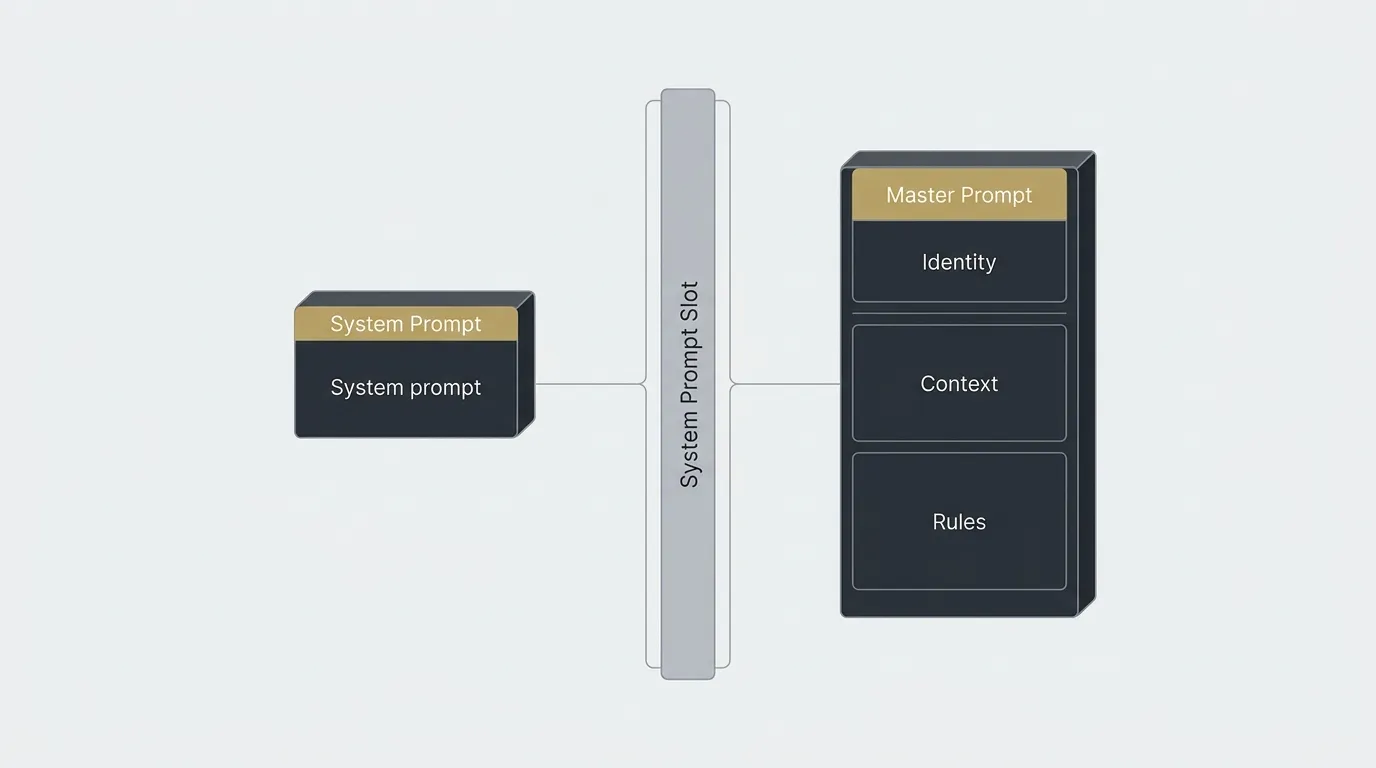
Master prompt came from the community side, not the API side. Productivity creators and prompt-framework sellers pushed the term to describe a long, comprehensive system prompt that packs in user context, business rules, writing style, workflow logic, and reusable constraints, sometimes stretching to 20+ pages; documented examples include Tiago Forte’s Master Prompt Method from April 2025 and LinkedIn framings like Master System Prompt OS. In actual use, that whole block still gets pasted into the same system prompt slot.
A master prompt is just a system prompt that grew up.
What Is a Master Prompt?
A master prompt is a reusable instruction document that tells an AI model how to behave across a workflow. It usually defines the role, context, rules, output format, voice, examples, refusal logic, and anything else the model needs to produce consistent work without being re-briefed every time.
The important part: “master prompt” is not an official technical field in most AI products. In an API, this instruction block is usually still passed as the system prompt. The term master prompt became popular because creators and operators needed a name for the longer, more complete version of that system instruction.
A short system prompt might say: “You are a helpful assistant that rewrites support emails in a professional tone.” A master prompt goes further. It defines the brand voice, banned phrases, escalation rules, sample outputs, customer types, preferred structure, and how the model should handle missing information.
That is why the term matters. A master prompt is not a magic prompt. It is persistent context. Used properly, it stops every AI session from starting at zero and gives the model a clear operating system for the work.
System Prompt vs Master Prompt: Side-by-Side
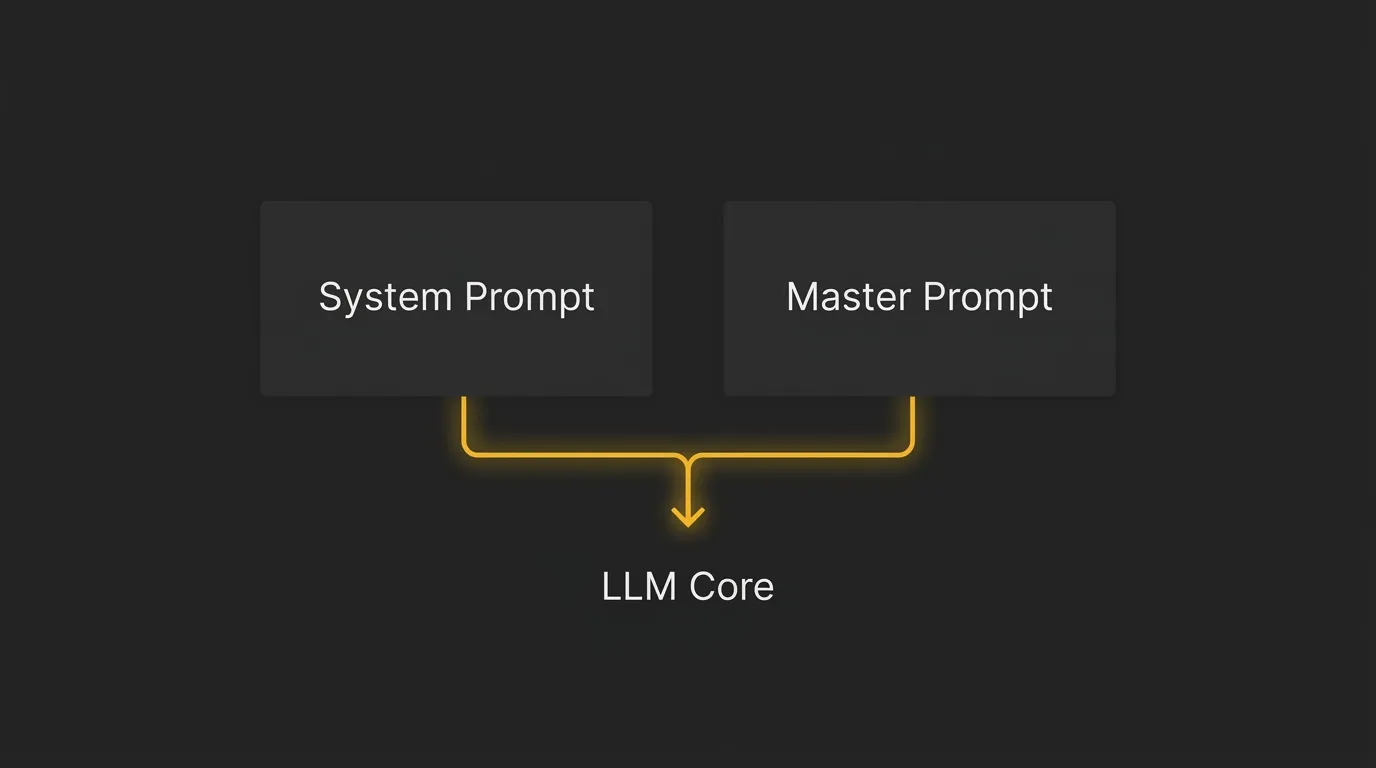
The cleanest way to think about this is simple: both terms point to the same architectural slot in the model stack. The difference is not where they live, but how much context, control, and operating logic gets packed into that instruction layer.
| Attribute | System Prompt | Master Prompt |
|---|---|---|
| Origin of term | Official LLM API spec (OpenAI, Anthropic, Google, xAI, Mistral) | Community/creator term (Tiago Forte, LinkedIn productivity creators) |
| What it is | The system role field passed to the model API | The same field, it is a system prompt |
| Typical length | 50–500 words | 2–20+ pages (full operating doctrine) |
| Purpose | Configure behaviour for a single task or workflow | Encode persistent identity, voice, rules, data, and decision logic across many workflows |
| Scope | One task or bounded interaction type | Entire workflow, project, brand, or operating context |
| Author | Developer or prompt engineer | Founder, operator, or team encoding a full operating system |
| Updated when | Task or output requirements change | Brand, business, role, or strategy changes |
| Example | “You are a helpful assistant that classifies emails as urgent or not.” | 20-page doc covering identity, ICP, voice, evidence rules, output schema, taboos, escalation logic |
Where User Prompts Fit In
The three-layer mental model
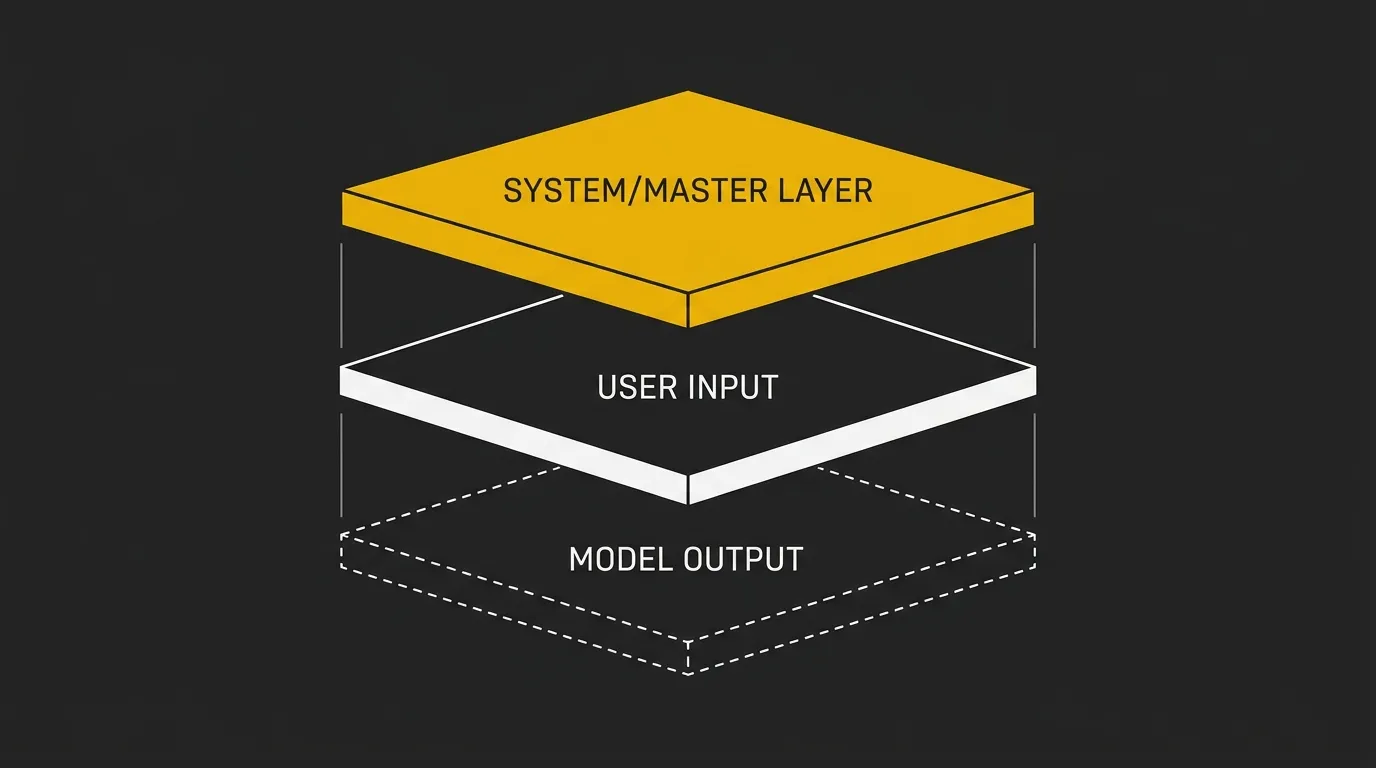
Think of it as a simple stack, top to bottom. Layer 1 is the system prompt, or master prompt, which holds persistent instructions, role, rules, and guardrails that are set once and reused across interactions.
Layer 2 is the user prompt, which is the specific request made in the moment. Layer 3 is the assistant response, which is the model’s output back to the user. Different job.
The key point is that master prompt and system prompt sit in the exact same layer. User prompts are a separate input type entirely, and they change from turn to turn.
Why most people only ever see user prompts
Most people only see user prompts because consumer chat interfaces hide the system layer by default. In ChatGPT, it sits behind Custom Instructions in Settings → Personalization or inside a Project, while Claude places it in project-level custom instructions.
So when a creator shows a long master prompt loaded into a Project, beginners think they are seeing a new prompt category. They are not. They are just seeing the system prompt slot used properly for the first time.
Master prompt and system prompt are the same layer. User prompt is the one below it.
What Goes Inside a System Prompt (Master or Otherwise)
This is the practical anatomy. A short system prompt usually covers only the basics, while a master prompt fills in every structural layer that matters for repeatable output.
| Component | Minimal System Prompt | Standard System Prompt | Master Prompt |
|---|---|---|---|
| Identity / Role | ✓ | ✓ | ✓ |
| Objective / Task | ✓ | ✓ | ✓ |
| Context (about user or business) | — | ◐ | ✓ |
| Constraints & rules | — | ✓ | ✓ |
| Output format / schema | ◐ | ✓ | ✓ |
| Examples (few-shot) | — | ◐ | ✓ |
| Evidence & data sources | — | — | ✓ |
| Escalation / refusal logic | — | — | ✓ |
| Voice & tone | — | ◐ | ✓ |
| Taboos / banned phrasing | — | — | ✓ |
A master prompt is what you get when you fill in every row. That is the real jump from a short system instruction to a full operating document.
In real-world master prompts, especially for higher-stakes workflows, you often see explicit JSON output schemas and refusal rules such as insufficient evidence. That is the pattern behind longer operating docs like LinkedIn-style ICP Decision OS frameworks.
When to Use a Long Master Prompt vs a Short System Prompt
The right choice comes down to scope, repeatability, and how expensive inconsistency would be.
Use a short system prompt when
- Single, bounded task, such as summarize, classify, extract, or draft.
- One-off chat or quick experiment.
- Output requirements are simple, and the model already has the domain knowledge.
- Speed of iteration matters more than consistency.
- You’re testing prompt ideas before committing to a full system.
Use a master prompt when
- The same context applies across dozens or hundreds of tasks, such as running a brand, content engine, or lead scoring workflow.
- Decisions have downstream consequences, including hiring, ICP qualification, or customer-facing content.
- Multiple people or agents need to behave consistently.
- The output needs to sound like a specific brand or person, not generic AI.
- You need explainability, meaning you can defend a decision weeks later.
- You’re feeding token-heavy context that you do not want to retype every time.
In my experience, most solo operators and small teams need exactly one master prompt per workflow they actually care about, usually content generation, ICP scoring, or customer support. Everything else can stay short.
One more practical point: long master prompts add token cost to every API call. If you plan to run them at scale, it is worth estimating the cost first with a free token calculator like AI Token Calculator.
How to Structure a Master Prompt (7-Step Build)
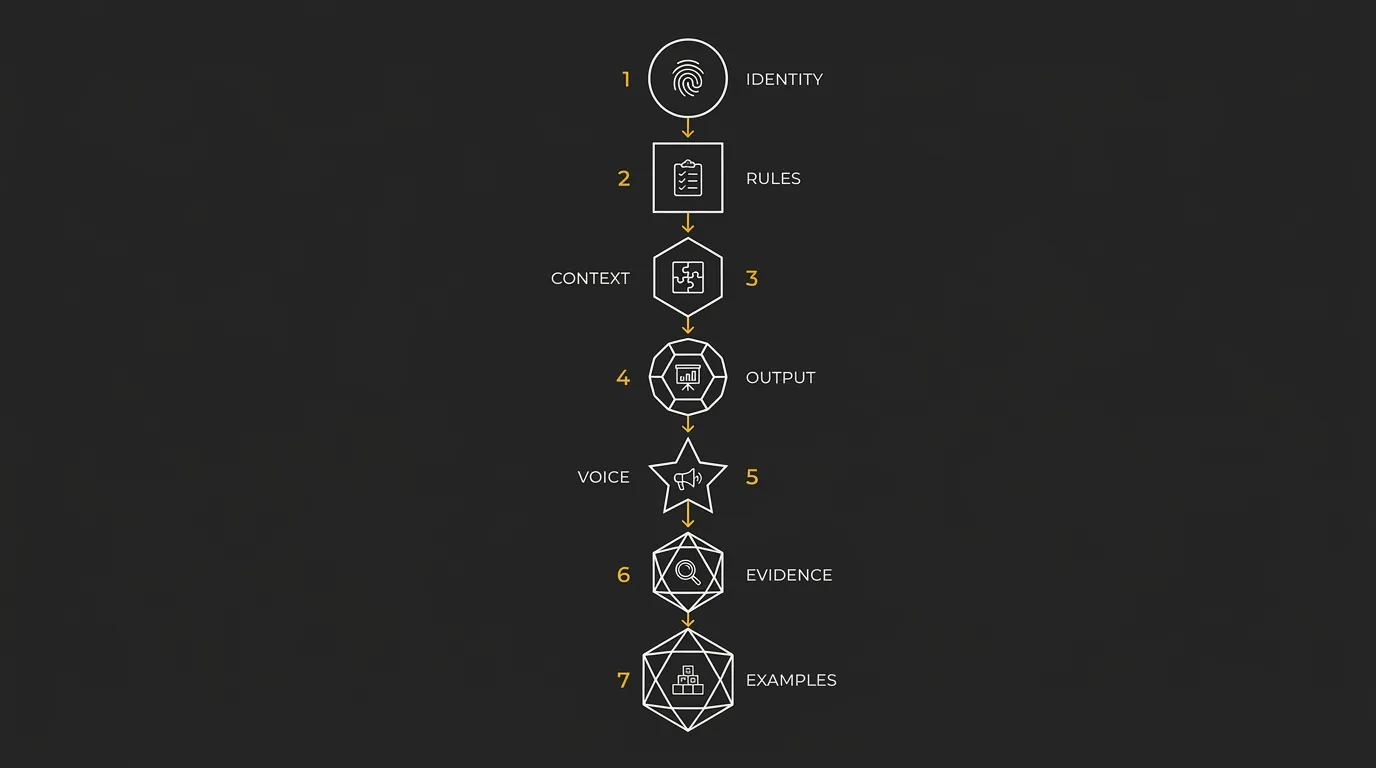
If you are building a master prompt for a repeatable workflow, the easiest approach is to build it in layers. For something like an ICP qualification workflow, each step adds one missing control point, so the prompt gets more reliable without turning into a random wall of text.
Define identity and role
Start by stating who the AI is for this workflow and what job it is responsible for. In an ICP qualification setup, that means defining whether the model is a researcher, scorer, or final decision support layer.
- persona name
- expertise level
- scope of authority
⚠️ Watch for: avoid generic helpful assistant language, be specific.
State the non-negotiables
Write down the hard rules before anything else gets added. This is where you define what the model cannot do, even if the rest of the prompt points in a different direction.
- factual accuracy rules
- refusal conditions
- escalation triggers
Load the context
Now add the business and domain information the model needs to make good decisions repeatedly. For an ICP decision workflow, this is where company fit, buyer profile, offer context, and internal language get encoded.
- ICP
- products, pricing, internal terminology
- brand history
⚠️ Watch for: this is where master prompts balloon to 10+ pages, but it is also where most of the value lives.
Specify the output format
Tell the model exactly how the answer should come back. If the output feeds another system, this step matters just as much as the reasoning itself.
- required keys
- character limits
- fallback values
⚠️ Watch for: if output feeds another system, lock the schema explicitly.
Encode voice and taboos
Add the language rules that make the output sound like your team, not generic AI. This is where you define preferred phrasing, banned wording, and the right tone register for the workflow.
- always use…
- never use…
- sample sentences
Add evidence and refusal logic
Force the model to show restraint when the inputs are weak or incomplete. For ICP qualification, that often means allowing a fit score only when the required evidence is present, otherwise flagging a human.
- confidence levels
- refusal triggers
- when to flag a human
Add few-shot examples
Finish with a small set of worked examples that show the model what good looks like. In practice, these examples often shape behavior more strongly than abstract instructions do.
- edge case
- ideal case
- common-mistake case
⚠️ Watch for: examples carry more weight than instructions.
Common Mistakes That Break Master Prompts
Treating it like a one-off prompt
This breaks the whole point. A master prompt is doctrine, not a command for one chat, so if you rewrite it every week, you do not really have a master prompt, you have a long system prompt you keep patching. The fix is to treat it like a versioned document with named updates and a simple changelog.
Stuffing it with vague instructions
Words like helpful, professional, or clear sound nice but give the model almost nothing to act on. Replace each vague adjective with a concrete rule, a worked example, or a banned phrase list, so sound professional turns into no exclamation marks, no emojis, and end with a single next-step ask.
Forgetting the refusal logic
If you do not tell the model when to stop, it will often try to complete the pattern anyway. That is where weak outputs and made-up certainty creep in, especially in higher-stakes workflows. The fix is simple: make insufficient evidence a valid output and define the exact trigger for escalating to a human.
Skipping the voice layer
This is why so much AI-written content sounds identical. Without voice rules, the model falls back to generic phrasing, generic rhythm, and generic filler, which is already most of the content online. Hot take: most AI-generated content sounds the same because this step gets skipped, so feed the prompt real writing samples, banned vocabulary, signature phrases, and sentence-length patterns.
Where to Put Your Master Prompt (Tool-by-Tool)
ChatGPT (Custom Instructions and Projects)
In ChatGPT, a master prompt goes into Custom Instructions for personal, cross-chat behavior, specifically under Settings → Personalization → Custom Instructions. If the prompt is meant for one workflow only, put it inside a Project instead, because Project instructions persist across every chat in that Project.
Claude (Projects)
In Claude, the right home is the project-level Custom instructions field inside a Project. That field acts like a system prompt scoped to the project, but because Anthropic models tend to weight user messages more heavily, it is smart to repeat any critical rules in the user prompt too.
API calls (system role)
In API use, the master prompt goes into the system layer, either as a message with the role set to system, as used by providers like OpenAI, xAI, and Mistral, or as the system parameter in Anthropic-style calls. Same slot, same mechanism, just a different interface. Because master prompts are token-heavy on every request, it is worth checking the cost with a free token calculator like AI Token Calculator before you roll them out at scale.
Custom apps and agents
In custom apps and agent frameworks such as n8n, Make, LangGraph, and LangChain, the master prompt is loaded as the system message at the start of each conversation thread. If you are running multiple agents, each one should get its own master prompt scoped to its exact role, not one giant shared instruction block.
Regardless of the tool, the master prompt always lands in the same architectural slot, the system message.
The Bottom Line
System prompt is the technical term used by every major LLM provider. Master prompt is the community term for a system prompt that has grown up, with identity, rules, context, voice, and refusal logic built in. Same architectural slot, different ambition.
If you are building anything that needs to sound like you, or your brand, at scale, the real work sits inside the master prompt. Most people write a 200-word system prompt and then wonder why the output still sounds generic. The fix is not a better tool, it is a longer, sharper, voice-aware master prompt, and before you scale it, it is worth estimating the token cost with something like AI Token Calculator, which covers all top LLM models for free.
Calculate your system AI token costs for free ⇒
Frequently Asked Questions
Is a master prompt the same as Custom Instructions in ChatGPT?
Functionally, yes. Custom Instructions is ChatGPT’s UI label for the system prompt slot at the account level, so if you paste a master prompt there, it becomes the persistent instruction layer for chats outside a Project.
Inside Projects, ChatGPT gives you a separate project-scoped instruction field. That means the same kind of master prompt can live either at the account level or the project level, depending on how broadly you want it applied.
Can I have multiple master prompts for one project?
No, not within a single Project. Each Project has one system prompt slot, so if you need one master prompt for content and another for ICP scoring, the clean fix is to create separate Projects or separate API calls with different system messages.
This keeps the instruction layer tight and reduces collisions between workflows. One project, one doctrine.
How long should a master prompt be?
A master prompt should be as long as it needs to be, but not longer. Documented examples range from a couple of pages to 20+ pages, including Tiago Forte’s April 2025 Master Prompt Method example around that length.
The real driver is workflow complexity. If you need identity, context, rules, voice, schemas, and refusal logic, the prompt gets longer for a reason.
Do master prompts work the same way in Claude as in ChatGPT?
Mechanically, yes. In both tools, the master prompt lives in the system-level instruction slot, but Anthropic’s models tend to weight user messages more heavily than the system prompt.
That means critical rules should be repeated in the user prompt when you build for Claude. Same slot, slightly different behavior in practice.
Where can I find a real master prompt example to copy?
A real example is available in the LinkedIn ICP Decision OS article by Muhammed Shaphy. It publishes a full copy-paste master prompt for ICP qualification, including a JSON output schema and refusal logic.
That makes it a solid structural template to adapt, even if your workflow is different. Copy the architecture, then swap in your own context, rules, and voice layer.
Does a longer master prompt always mean better output?
No. Longer prompts increase token cost on every call and can make outputs worse if they are padded with vague instructions or conflicting rules.
Length only helps when each section adds concrete context, tighter constraints, better examples, or clearer refusal logic. If a paragraph does not change model behavior, it probably does not belong there.