Introduction
Good system prompt engineering best practices matter because a system prompt on its own is stateless, so every new session starts from zero unless you carry context forward. That is why teams get inconsistent outputs, tone drift, and answers that feel fine in one run and off in the next.
This list is for developers, AI API users, and anyone building LLM systems that need repeatable output, not just one good response. It is grounded in real workflow experience: what actually holds up when you are building prompts inside production systems, testing outputs, and trying to stop the model from filling gaps with defaults.
The ranking is editorial, and #1 is the highest-leverage practice most people skip. The big gap in most advice is simple: people obsess over wording, when the real win usually comes from context engineering first.
Estimate your token costs for free ⇒
TL;DR: The System Prompt Practices That Matter Most
The single biggest win in system prompt engineering is engineering persistent context, not tweaking wording.
- For consistent output across sessions: engineer context, not wording
- For shorter usable responses: define output structure
- For reusable multi-niche prompts: use placeholders
- For accuracy on complex tasks: build a self-audit and manual review step
- For cleaner downstream automation: constrain format and field order
- For easier testing over time: version prompts and compare outputs
- For less model guessing: state the task, role, limits, and success criteria up front
1. Engineer Context, Not Wording
Overview
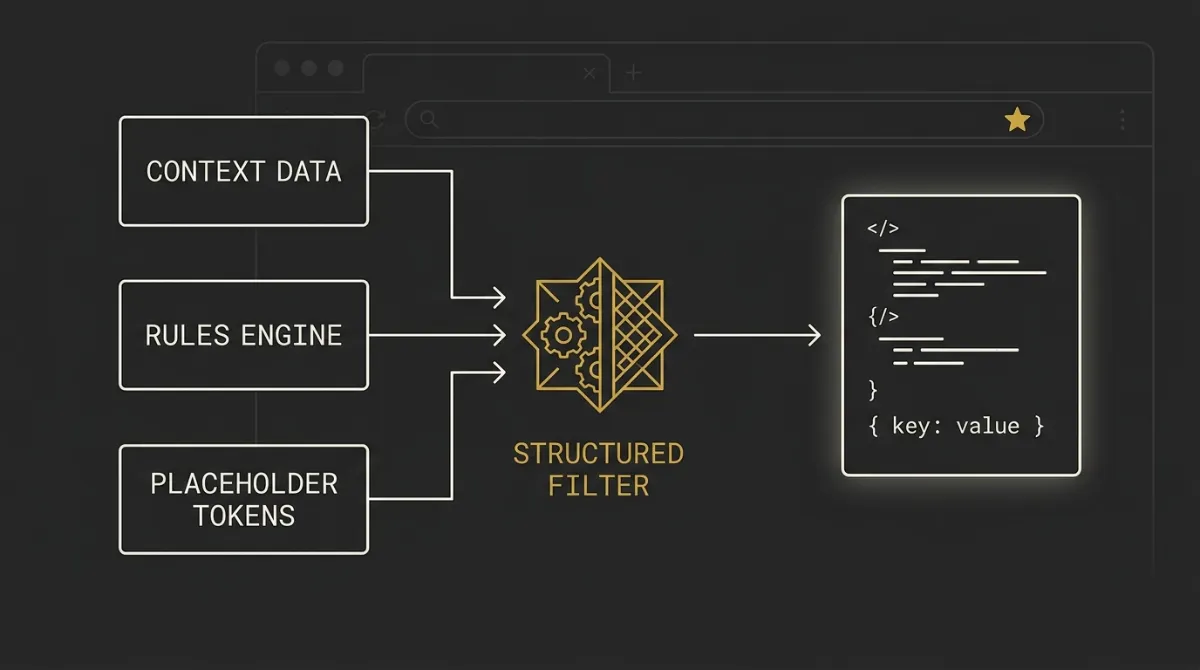
Context engineering is the practice of deliberately building what goes into the model’s context window before it produces anything. In plain terms, this is about giving the model the right working memory, not just a prettier instruction.
System prompts are stateless, so without persistent context, every session restarts from scratch and output drifts fast. That is why teams keep seeing the same pattern: one run sounds sharp, the next one invents details, drops constraints, or falls back to generic filler.
Why It Works
More relevant context in usually means more targeted output out. When the model has the real rules, source material, definitions, and boundaries in front of it, it has less room to guess.
This scores highest on consistency and reliability because it reduces variance across sessions, not just inside one lucky run. It also cuts a common failure mode on complex tasks: the model confidently making up policies, features, or facts because nobody anchored it to the right source material first.
How to Apply It
Build a reusable context pack that travels with every session or workflow. That pack can include brand voice rules, task constraints, approved terminology, source documents, definitions, examples, and any hard limits the model should not cross.
Keep the pack modular so you can swap parts in and out by use case instead of rewriting everything each time. For example, one layer can stay fixed across all runs, while another layer changes by client, product, or task.
A simple structure looks like this:
- Core rules: role, boundaries, quality bar, refusal conditions
- Domain context: product facts, internal terminology, approved claims
- Output rules: format, length, fields, required sections
- Task-specific inputs: the exact brief, data, or source material for that run
If you are building production flows, this is also where observability matters. Track which context blocks were attached, what output they produced, and where drift still shows up.
Common Mistakes
The biggest mistake is re-briefing the model every session with slightly different wording and expecting stable output. That creates avoidable drift because the system changes every time, even if the task did not.
The second mistake is chasing better phrasing when the real issue is missing context. If the model does not know your rules, your data, or your boundaries, a clever sentence in the system prompt will not fix the underlying reliability problem.
2. Front-Load Context in the Prompt
Overview
Front-loading context means putting the most important instructions and reference information at the top of the prompt before the model starts generating.
If the model needs the full picture to answer well, give it that picture early. Do not make it infer the task from scattered turns or buried constraints halfway down the prompt.
Why It Works
More context up front usually means more targeted output and fewer recovery turns later. That helps on token and cost efficiency because you waste less space on clarifications, hedging, and corrections after the model has already gone in the wrong direction.
It also lines up with a broad prompt-engineering consensus: the quality of the input shapes the quality of the response. In practice, leading models often weight early instructions strongly, so burying the real brief lower down is a simple way to get weaker output.
How to Apply It
Put your highest-priority instructions first, then the key context, then the task input. A clean top-to-bottom order usually works better than mixing examples, constraints, and raw data randomly.
A simple structure looks like this:
- System rules: role, boundaries, success criteria
- Core context: definitions, source facts, approved terminology
- Output requirements: format, length, sections, field order
- Current task: the specific input for this run
Keep the top of the prompt dense, but not messy. If a detail is important enough to change the answer, it belongs early, not tucked into the last paragraph.
Common Mistakes
A common mistake is trickling context across multiple turns and expecting the model to stitch it together perfectly. That often raises token use because the first answer misses the mark, then you spend extra turns patching it.
Another mistake is burying the real instruction under background text, examples, or low-priority notes. If the model has to dig for the actual job, reliability drops fast.
3. Define the Output Structure Explicitly

Overview
Defining the output structure explicitly tells the model exactly how the answer should be shaped before it writes a single line.
A model that knows the format does not need to ramble its way toward a usable answer. If you need JSON, bullets, a table, fixed sections, or a word limit, say that directly.
Why It Works
This improves token efficiency because the first response is usually closer to usable. You spend fewer turns asking for rewrites like make it shorter, turn this into bullets, or format this for a downstream step.
It also improves usability. Structured output is easier to read, easier to compare, and much easier to parse when the result is headed into another system.
How to Apply It
State the exact structure in the prompt, not just the topic. Good format instructions are concrete: number of bullets, field names, section order, cell limits, sentence limits, or a compact schema.
You can also prime the model by showing the form before the content. For example, you might say:
- Return exactly 3 bullet points, one sentence each
- Use JSON with fields: summary, risks, next_step
- Format the answer as: overview, steps, common mistakes
If the output will be reused in code, keep the structure tight and repeatable. If the output is for humans, make the structure scannable enough that someone can use it without another editing pass.
Common Mistakes
The first mistake is asking for a format vaguely, like make it clear or keep it concise. That leaves too much room for the model to improvise.
The second mistake is over-anchoring on an example value. If you show a sample object or sample sentence, the model may copy the wording, labels, or values too literally unless you make clear that the example shows shape, not content.
4. Use Placeholders in Reusable System Prompts
Overview
Placeholder-driven system prompts keep the master instruction portable by swapping niche-specific wording for variables that can be filled with real context later.
This is a gap a lot of prompt advice misses. If your base prompt says things tied to one offer, one audience, or one metric, it stops being a reusable system and starts becoming a hidden one-off.
Why It Works
Placeholders improve portability because one prompt can serve many brands, workflows, and use cases without dragging old assumptions into new tasks. Instead of rewriting the whole system prompt for each project, you keep the logic stable and swap the facts that actually change.
It also reduces bias from niche lock-in. A master prompt built around one example can quietly steer every later output back toward that same framing, even when the new task needs something else.
How to Apply It
Replace brand-bound details with clear variables such as [brand_name], [target_audience], [core_offer], [primary_metric], or [main_problem]. Then fill those variables at runtime with real, case-specific facts.
For example, instead of hardcoding a line like stop losing traffic to AI search, you can write stop losing [resource] to [problem]. That same prompt can then work across SEO, support, operations, sales, or product use cases without rebuilding the core instruction set.
The safest variable groups to template are:
- Brand identity: name, tone, terminology
- Audience: role, industry, sophistication level
- Offer details: product, service, promise, constraints
- Proof points: approved metrics, examples, differentiators
The key is simple: keep the system stable, swap the facts. That is what turns a decent prompt into a reusable asset.
Common Mistakes
The biggest mistake is hardcoding niche-specific examples into the master prompt and forgetting they are there. Later, the model keeps pulling that old framing into unrelated outputs because you baked the bias into the base system.
The second mistake is using placeholders but not filling them with real values before runtime. When variables stay vague or empty, the model falls back to generic defaults, which defeats the whole point of making the prompt reusable in the first place.
5. Ground the Model in Your Folder, Not Google
Overview
The strongest system-prompt workflow is two-phase: build the context folder first, then run the model grounded only in that folder.
Phase 1 is where you assemble the real source of truth, such as tone, USPs, offers, audience details, rules, and approved data. Phase 2 is where you generate against that material instead of letting the model fill gaps from general web patterns.
Why It Works
Skip Phase 1 and the model has to ground itself somewhere else. In practice, that usually means default training patterns and whatever generic framing is most statistically likely, which is why so much AI output sounds like watered-down competitor content.
This improves consistency and reliability because the model is working from your actual materials, not broad internet averages. It also reduces invention, since the task becomes answer from this folder, not guess from the web.
How to Apply It
Start by assembling a dense context folder before generating anything. Useful files can include brand voice notes, product facts, offer details, audience profiles, approved claims, internal definitions, example outputs, and any factual source material the model is allowed to use.
Then attach that folder or pass its contents into the workflow and make the source restriction explicit. The instruction can be simple: use only the provided materials, and do not rely on outside assumptions unless the task explicitly allows it.
A clean working pattern looks like this:
- Phase 1: build the folder
- Phase 2: attach the folder
- Phase 3: generate with source limits
- Phase 4: review for drift or unsupported claims
This is also where grounded context and output structure work well together. If the source is tight and the format is tight, the result is usually much more usable on the first pass.
Common Mistakes
The biggest mistake is trying to generate everything in one session with no folder at all. That feels fast, but it usually produces generic output because the model has nothing brand-specific to hold onto.
Another mistake is attaching source files but still leaving the model free to roam broadly. If you want grounded output, say so directly and keep the allowed source set clear.
6. Build a Self-Audit Into the Prompt
Overview
A prompt-level self-audit forces the model to justify its own choices before you trust the answer.
One of the simplest ways to do this is to ask, why approach A and not B? That extra check often surfaces weak assumptions or hidden errors the model would not volunteer on its own.
Why It Works
Even with strong context, the model can still latch onto the nearest familiar pattern and sound confident while being wrong. A self-audit lowers that error rate because it makes the model inspect its own path instead of just delivering the first plausible output.
This matters most on complex tasks, where reliability is the real bottleneck. Good context helps a lot, but it does not make the model infallible.
How to Apply It
Bake a review step into the prompt itself. After the main answer, ask the model to verify its reasoning against the instructions, check for unsupported assumptions, and explain why it chose its current approach over at least one reasonable alternative.
Useful self-audit prompts include:
- Why did you choose this approach and not the closest alternative?
- Which part of this answer depends on an assumption not stated in the source?
- What would you revise if strict accuracy mattered more than speed?
Treat the model like a collaborator you double-check, not an oracle you obey. The goal is not endless back-and-forth, just one deliberate interrogation step before the output gets used.
Common Mistakes
The biggest mistake is assuming full context means zero errors. It does not, and that false confidence is exactly where subtle mistakes slip through.
Another mistake is ending the interaction the moment the first answer looks polished. On harder tasks, keeping the conversation going for one audit pass is often what separates usable output from confident nonsense.
7. Always Review Before You Ship
Overview
Manual review is non-negotiable, no matter how good the system prompt or model looks on paper.
Even strong models with full context still miss things, especially on broad or messy tasks like reviewing an entire site or codebase. Never hand off AI output without checking it manually first.
Why It Works
The most expensive AI mistake is not a bad first draft. It is skipping review and sending flawed output to a client, stakeholder, or live environment.
This is really a reliability rule. Models are non-deterministic, inputs vary, and even well-trained agent flows can drift in subtle ways that only become obvious under human review.
How to Apply It
Build a review checkpoint into every workflow before anything gets published, shipped, or delivered. That checkpoint should verify facts, tone, compliance with instructions, and whether the answer actually matches the task.
For higher-risk work, review in this order:
- Factual accuracy
- Unsupported claims or invented details
- Format and instruction compliance
- Tone, voice, and client-safety
Keep your eyes on your agents, no matter how polished the setup looks. A strong system prompt helps reduce mistakes, but it does not remove your responsibility to catch them.
Common Mistakes
The first mistake is trusting good models too much just because recent outputs looked strong. Better models lower the error rate, but they do not remove it.
The second mistake is shipping unreviewed client work because the draft sounds clean. Polished language can hide factual misses, tone drift, or subtle contradictions, which is exactly why the final human check has to stay in the system.
System Prompt Best Practices Comparison Table
These seven system prompt practices work best when treated as a stack, not isolated tricks. The table below compares where each one helps most, what benefit it creates, what usually goes wrong, and how much effort it takes to put in place.
| Practice | Best For | Core Benefit | Main Pitfall | Effort to Implement |
|---|---|---|---|---|
| Engineer Context Not Wording | Consistency across sessions | Less drift, better targeting | Re-briefing every session | High |
| Front-Load Context | Targeted first outputs | Fewer wasted turns | Burying key instructions | Low |
| Define Output Structure | Usable structured responses | Easier parsing downstream | Vague format requests | Low |
| Use Placeholders | Reusable master prompts | Portable across niches | Hardcoded niche bias | Medium |
| Ground in Your Folder | Brand-specific generation | Less generic regurgitation | No source restriction | High |
| Build a Self-Audit | Complex decision tasks | Lower hidden error rate | Trusting first answer | Medium |
| Always Review | Client-facing deliverables | Last-mile reliability check | Shipping unreviewed work | Medium |
How to Choose the Right Practices for Your Workflow

If you are deciding where to start, start with context first. Most prompt problems that look like wording problems are really consistency, grounding, or reliability problems upstream.
Start with your consistency problem
If the same prompt keeps producing uneven output, engineer context before anything else. That usually means building a clearer source of truth, tightening what the model is allowed to use, and making the setup more repeatable instead of rewriting phrasing every time.
Match the practice to task complexity
Simple tasks often only need front-loaded context and explicit output structure. More complex work, especially analysis, planning, or broad review tasks, usually needs grounding plus a self-audit step because the error surface is bigger.
Decide between one-off prompts and reusable systems
If the prompt will only be used once, you can keep the setup lighter and focus on context plus structure. If it needs to work across clients, brands, or niches, move toward reusable prompt systems with placeholders, folders, and stricter source handling so portability does not destroy quality.
Always pair automation with human review
No matter how polished the workflow looks, review stays mandatory. Automation can improve speed, consistency, and token efficiency, but the final reliability check still comes from a human reading the output before it ships.
How We Evaluated These Practices
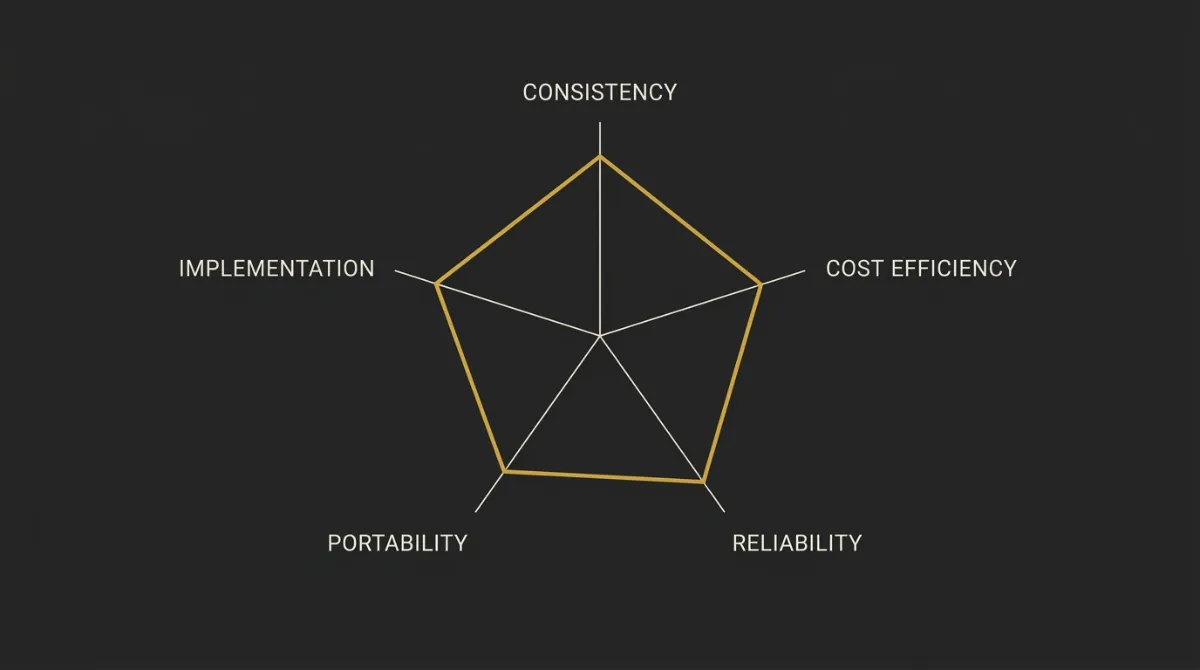
We used five criteria to judge each practice, and we apply them the same way across every entry. That keeps the strengths and weaknesses grounded in actual system behavior, not prompt-theory fluff.
Impact on output consistency
This measures whether a practice helps the model produce the same kind of answer across repeated runs and new sessions. If a technique reduces drift in tone, structure, and task handling, it scores higher here.
Token and cost efficiency
This looks at how much prompt and response space gets wasted on avoidable back-and-forth, hedging, corrections, or reformatting. A good practice should make the first usable output shorter to reach, which matters even more if you are tracking AI token costs.
Reliability across edge cases
This checks how well a practice holds up when the input is messy, incomplete, or slightly outside the happy path. A system prompt is only useful if it still gives controlled output when the task gets weird.
Portability and reuse
This measures whether the same prompt pattern can be reused across clients, projects, tools, or niches with minimal rewriting. Practices that depend on hard-coded wording score lower than patterns built for variables, templates, and shared context.
Ease of implementation
This looks at how hard the practice is to add to a real workflow without slowing the team down. High-scoring practices are practical to ship, test, and maintain, even if your setup is still pretty lean.
Estimate AI token costs for free ⇒
How System Prompts Change Token Cost
A system prompt sits in the input on almost every request, so its cost is recurring rather than one-off. That does not make a long prompt wrong. It makes an unexamined one expensive.
The expensive side is usually the answer, not the instruction. Output tokens are priced several times higher than input tokens across the major providers, which is why an explicit output contract beats trimming the instruction. Return these five fields, in this order, under 120 words costs less than letting the model decide how long a good answer should be.
Format is the next lever. The same content expressed as JSON costs meaningfully more than plain text or a markdown table, because every brace, quote, colon and comma has to be tokenized. Ask for JSON when a downstream system parses it. Use markdown when a human reads it.
For agent workflows, caching dominates. Anthropic prices a standard cache write at 1.25x base input tokens and a cache read at 0.1x, so a stable prefix that keeps hitting the cache costs a fraction of one that keeps missing it. Stable system prompts, stable tool definitions and a clean context block are cost control, not just hygiene.
Paste your actual system prompt into the AI Token Calculator to see what it costs per call before it goes into production.
Frequently Asked Questions
What is a system prompt in prompt engineering?
A system prompt is the persistent instruction layer that sets the model’s role, behavior, boundaries, and context before the user starts asking for anything.
It works like the operating framework for the conversation. Instead of telling the model only what to answer, it tells the model how to behave while answering.
What is the difference between a system prompt and a user prompt?
A system prompt sets the persistent framework, while a user prompt gives the specific task or question for that moment.
In practice, the system prompt defines things like tone, rules, format expectations, and context. The user prompt is the changing input, such as summarize this article, review this code, or explain this topic to a beginner.
Is prompt engineering still necessary with newer AI models?
Yes, prompt engineering is still necessary with newer AI models.
Better models reduce friction, but they still need clear context, structure, and constraints to produce reliable output. Stronger models often make bad assumptions more fluently, which means good setup still matters.
How detailed should a system prompt be?
A system prompt should be as detailed as needed to remove ambiguity from the task.
If the model needs to follow a tone, source restriction, structure, or workflow, say that directly. Models do not fill gaps the way a human teammate with shared history might, so vague instructions usually lead to vague output.
Why does my AI output still sound generic with a good prompt?
AI output usually still sounds generic because the prompt is not backed by enough specific context or the model is grounding on broad web patterns instead of your material.
A cleanly written prompt is not the same thing as a well-grounded system. If the model does not have your voice, terminology, approved facts, and source boundaries, it will often fall back to the most statistically common answer shape.
How do I stop a system prompt from being locked to one use case?
You stop a system prompt from being locked to one use case by replacing niche-specific details with placeholders and filling them at runtime.
That keeps the core instruction stable while letting the facts change per brand, client, or workflow. Without placeholders, one strong example can quietly bias every later output toward the same use case.
Should I trust AI output if my system prompt has full context?
No, you should not trust AI output blindly even if the system prompt has full context.
Good context lowers the error rate, but it does not reduce errors to zero. Manual review is still required, especially for client-facing work, technical outputs, and any task where a subtle miss can create a real downstream problem.