Introduction
Running a big AI job without knowing the cost first is a bad way to find out your prompt was too long. A token estimator solves that specific problem: it tells you the price of a job before you hit run, not after the invoice shows up.
The real pain isn’t understanding tokens in theory. It’s staring at a batch of 10,000 support tickets or a document pipeline and having no idea if you’re about to spend $4 or $400.
This page teaches you how to estimate token counts by hand, what actually shifts that estimate (content type, language, formatting, conversation length), and where the common word-to-token rule of thumb quietly falls apart. What it won’t do is walk you through building your own calculator in prose.
If you want a quick and easy estimate, use the Token Calculator ⇒
How to Estimate Token Cost Before a Run
Estimating token cost before a run means converting your text into a token count, multiplying that count by the model’s per-million input and output rates, then scaling by how many times the text gets rebilled through turns or loops. Do that math once, and you know the price of the job before you commit compute or budget to it.
Long debugging sessions in agent tools are exactly where this matters most. A single CLI session that loops through context repeatedly can rack up cost fast, so estimating before you start the run (not after reviewing the bill) is the only way to catch a runaway prompt early.
The quick method
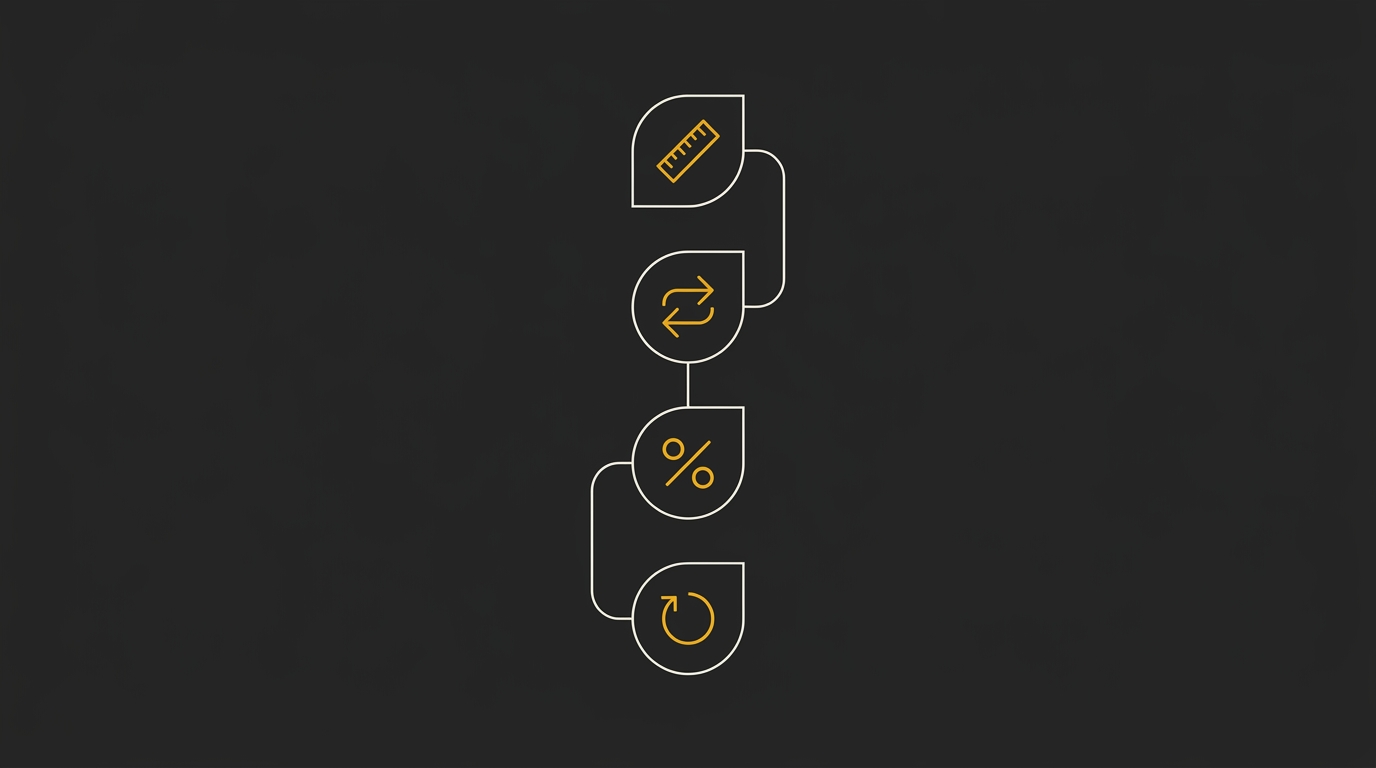
Four steps get you from raw text to a dollar figure.
- Measure your text size. Count words or characters in your prompt, system message, and any reference documents you plan to include.
- Convert to a token count. Apply a rough word-to-token ratio, or better, run the text through a token counter to get an exact number instead of guessing.
- Apply the model’s input and output rates. Multiply your input token count by the per-million input price, then estimate expected output length and multiply by the per-million output price.
- Multiply by turns or loops. If the job involves a back-and-forth conversation or an agent that calls tools repeatedly, multiply the per-turn cost by the expected number of turns, since context often gets resent each time.
Manual word counting gets you in the right neighborhood but rarely the right number, since tokenization doesn’t map cleanly to words. Running the same text through a free token estimator gives you the actual count in seconds, which matters once you’re multiplying by rate and turn count.
What you need before you estimate
Gather these four inputs before running the math, since missing any one of them turns your estimate into a guess.
| What to gather | Why it matters |
|---|---|
| Model chosen | Input and output rates vary widely by model and provider |
| Input token count | This is the base number every rate calculation multiplies from |
| Expected output length | Output tokens are often priced higher than input tokens |
| Number of turns or loop iterations | Multi-turn jobs rebill context, so cost compounds per turn |
Once you have those four, the calculation itself takes seconds. The part worth getting right is the input token count, since a rough word-based guess can be off by a meaningful margin once you’re scaling across dozens of turns or a long agent loop.
Why Estimating Before a Large Run Matters
Waiting for the invoice is too late because the damage is already done by the time you see it.
A big document batch is the clearest case: feed a token estimator 200 PDFs, and you might find the job costs ten times more than a quick sample of five documents suggested. Some files run long, some carry dense tables or code blocks that tokenize worse than plain prose, and none of that shows up until you count the whole batch, not just a slice of it.
A deep debugging session with a CLI agent burns tokens differently but just as fast. Each back-and-forth re-sends prior context, so a session that starts at a few thousand tokens can balloon past six figures after twenty or thirty turns, and you will not notice until the session ends or the bill does.
Agent loops are the sharpest case of all. A tool-calling agent can spin through dozens of self-triggered calls in minutes, and a single runaway iteration (one bad loop that keeps re-reading the same file or retrying a failed call) can consume far more tokens than the rest of the session combined. Tracking cost turn by turn, not just at the end of the session, is the only way to catch that spike before it compounds.
Context windows make this a fit problem as much as a cost problem. The token count decides whether your prompt is accepted at all, since every model caps input at a fixed number of tokens, and a prompt that overflows that limit gets truncated or rejected regardless of how much you were willing to pay for it.
That is the real argument for estimating before you run the job: cost and capacity are decided by the same number, checked once, before you spend anything.
The Words-Per-Token Rule of Thumb and Where It Breaks
The words-per-token rule holds for plain English prose but falls apart once your text includes code, structured data, or non-English content. It is a fine starting point and a poor finishing point.

The 0.75 words-per-token baseline
Most LLM tokenizers split plain English text at roughly 0.75 words per token, which works out to about 1.3 tokens per word.
That ratio comes from how tokenizers handle ordinary prose: common words map to single tokens, word boundaries are clean, and punctuation is light.
For a blog post, an email, or a support ticket written in conversational English, this baseline gets you close enough to plan a budget.
It works because natural language is predictable. Frequent words (the, and, is, to) get their own token, and even less common words usually split into just two or three token pieces.
The five cases that break it
Production text is rarely just prose, and each of these five content types pushes the words-per-token ratio higher than the baseline assumes.
Code is the biggest offender. Tokenizers were trained mostly on natural language, so symbols, indentation, and camelCase or snake_case variable names get chopped into far more tokens per word than plain text.
This matters more with certain providers than others. Estimators built around one company’s tokenizer can systematically undercount another provider’s usage on code, because formatting like brackets, indentation, and comment syntax gets split differently model to model.
JSON and other structured formats compound the problem. Braces, quotes, colons, and repeated key names all consume tokens without adding much readable content, so a small JSON payload can cost more tokens than a paragraph of equivalent length.
Tables behave the same way. Repeated delimiters, column headers, and cell padding add token overhead that a raw word count never captures.
Non-English text is another consistent under-estimator. Languages that use non-Latin scripts, or that build words through compounding, tend to split into more tokens per word than English does; this site’s own research, published as “Most Token-Efficient Language for LLMs: 11-Language Cost Study” and “The Most Token-Efficient Languages for LLMs (And How to Check Your Own),” measured exactly this kind of variance across languages.
Repeated structure, like boilerplate headers, log lines, or templated responses, also erodes the baseline. The words look simple, but the surrounding formatting adds tokens the naive word count never sees.
Here is the part that makes this more than a technical footnote: production AI workloads are made almost entirely of these five cases. Code generation, API responses, RAG pipelines returning structured chunks, multilingual support tickets: none of it is plain prose, so none of it should be estimated with the plain-prose ratio.
The next section breaks down exactly how much higher each content type pushes the multiplier, so you can adjust your estimate before you run the job instead of after.
Token Multipliers by Content Type
Different content types tokenize at different rates, so the 0.75-words-per-token baseline needs a correction factor once your input moves past plain prose. The table below gives directional multipliers against that baseline, not exact decimals, since actual ratios shift by tokenizer and model family.
Use it to sanity-check an estimate before you commit to a run, especially when your input mixes prose with code, tables, or structured data.
| Content type | Approx tokens per word vs prose | Why the ratio rises | Estimate correction |
|---|---|---|---|
| Plain English prose | Baseline (~1.3 tokens/word) | Common words map to single tokens most of the time | Use the 0.75-words rule as-is |
| Code | Roughly 1.5-2x prose | Indentation, brackets, and operators each tokenize separately from the words around them | Count characters or run it through a tokenizer instead of counting words |
| JSON / structured data | Roughly 1.5-2x prose | Braces, quotes, and repeated key names add tokens that carry no prose meaning | Add 50-100% over a word-count estimate |
| Tables | Roughly 1.3-1.7x prose | Delimiters and repeated cell labels stack up across rows | Estimate per-row token cost and multiply by row count |
| Non-English text | Often 1.5-3x prose (varies by language) | Many tokenizers split non-Latin scripts into more tokens per character | Test a short sample and scale up rather than trusting a word count |
| Repeated structure / boilerplate | Roughly 1.2-1.5x prose | Repeated headers, disclaimers, or templates get counted in full every time they appear | Multiply the boilerplate’s token count by how many times it repeats |
Every row here undercounts against the plain-word rule, which is exactly why a single word-count multiplier fails once your prompt leaves plain prose behind.
Code and JSON are the two worst offenders for a token estimator working from word counts alone, since neither one respects word boundaries the way prose does. Tables and boilerplate are more forgiving but still drift enough to throw off a cost estimate on a large run.
Ratios vary by tokenizer, so treat these multipliers as a correction to your first-pass estimate, not as a substitute for actually running the text through a token counter before a large or repeated job.
Turning Token Counts Into Cost Across Providers
A token count only becomes a cost once you multiply it against a rate, and that rate depends on which part of the exchange you’re paying for.
Providers bill per million tokens, and they split that bill into at least three buckets: input, output, and cached input.
Output tokens usually cost more per token than input tokens, sometimes several times more, because generating text is a heavier compute job than reading it.
Cached input sits at the cheap end. If part of your prompt (a system message, a long reference document) gets reused across calls, a cache hit charges a fraction of the normal input rate instead of the full price.
This is why an “output-heavy” job (long generations from a short prompt) costs more per token processed than an “input-heavy” job (a big document with a one-line question attached), even when the total token count looks identical on paper.
A concrete example: send a 2,000-token input and get back a 500-token output, and the output half of that job can easily cost more in dollars than the input half, because the per-token output rate runs higher.
Flip the ratio (a 500-token input generating 2,000 tokens of output) and the cost gap gets wider still, since now the expensive bucket is doing most of the work.
Cache visibility matters here too. A cache write (the first time content gets stored) is often priced differently from a cache hit (a later reuse of that same content), and without seeing that breakdown, it’s easy to assume caching is saving money when a chunk of it is still billing at write rates.
Input, output, and cached rates
Every major provider prices the same job as three separate line items instead of one flat per-token fee.
- Input tokens: what you send in, priced lowest of the three in most cases.
- Output tokens: what the model generates back, typically priced several times higher per token than input.
- Cached input tokens: repeated context the model has already processed, priced at a discount off the standard input rate.
This structure means the same token count can produce very different bills depending on the input-to-output split and how much of the input is cache-eligible.
A prompt-heavy, answer-light job (classification, extraction, tagging) tends to run cheap.
A prompt-light, answer-heavy job (long-form drafting, code generation, detailed reports) tends to run expensive, token for token.
Why the same job costs different amounts
The same piece of text produces different costs on OpenAI, Claude, and Gemini because each one tokenizes and prices independently.
Tokenization differences mean a 1,000-word document might come out to a slightly different token count depending on the model’s tokenizer, before pricing even enters the picture.
Pricing differences stack on top of that: OpenAI, Anthropic’s Claude, and Google’s Gemini each set their own input, output, and cached rates, and those rates change across model tiers within a single provider too.
So a job priced against a smaller, cheaper model and the same job priced against a larger, higher-context model can differ by an order of magnitude, even with an identical prompt.
This is the part that’s hard to eyeball. A word count gives you a rough token count, and a token count only becomes a real dollar figure once it’s run against a specific model’s specific rate card.
Rather than memorizing rate tables that shift every few months, run the job through the free AI Token Calculator and compare the same prompt across OpenAI, Claude, and Gemini side by side. It’s built for exactly this: turning one token count into an accurate cost per model, so the estimate you act on reflects the provider and tier you’re actually going to run.
Estimating a Multi-Turn Conversation
In a multi-turn chat, every new message re-sends the full conversation history, so you’re billed for that entire context on every single turn, not just the latest reply.

That’s why cost in a chatbot or support-bot job scales with cumulative context, not with the size of the newest prompt. The simplest way to estimate it: for each turn, add up the tokens in the system prompt, every prior user and assistant message, and the new message being sent, then total that across all turns rather than just checking the final one.
Take a 10-turn support chat as a working example. Turn 1 might carry 300 tokens (system prompt plus opening question), but by turn 10 the same system prompt is riding along with nine full exchanges behind it, so that single turn could carry 3,000 tokens or more before the model even generates a reply. Sum each turn’s payload separately and add them up; the final turn alone often costs more than the first four combined, simply because the window has grown that much by then.
Running that math by hand across ten turns gets tedious fast, so plug each turn’s cumulative text into a token estimator as you go to get a running total instead of guessing. Note that this section covers plain back-and-forth chat. Agent loops and tool-calling add their own overhead, covered next.
Estimating Agent and Tool-Calling Loops
Agentic workflows are where token estimates fall apart fastest, because each tool call, retry, or reasoning step is a fresh round-trip that resends the accumulated context, not a cheap add-on.
That compounding is the reason a coding agent debugging session can burn through a budget that looked fine on paper. Say an agent reads a file, runs a test, reads the error, edits the code, and reruns the test. Each of those five steps resends the growing conversation history plus the code it’s holding in context, so step five costs meaningfully more than step one even though the “task” hasn’t changed.
The practical fix is to estimate per loop, not per task. Work out the token cost of one typical iteration (system prompt, tool definitions, current context, and the model’s response), then multiply that by a realistic worst-case number of iterations rather than the number you hope it takes.
A stuck debugging loop that should resolve in three tries can easily run to eight or ten before an agent gives up or succeeds, and pricing for that scenario needs to reflect the ten, not the three.
Two failure modes make these estimates less reliable than they look. Subagents that spin off their own transcripts to do sub-tasks often store that work separately from the main conversation log, so a token count built only from the primary transcript will quietly undercount total usage.
Estimates built from local transcripts using published per-token API rates can also diverge from what a subscription plan actually bills, since flat-fee or bundled plans don’t always meter usage the same way the raw API does. Treat any agentic estimate as a floor, and pressure-test it against your worst realistic iteration count before committing to a large run.
Get an Exact Count With the Free Token Calculator
Sanity-checking with the rule of thumb and the content-type multipliers gets you close, but pasting your real text into a free token estimator gets you the exact number the API will actually bill.
The AI Token Calculator does that in one step: drop in your prompt, your document, or your whole conversation history, and it returns the precise token count alongside cost estimates for OpenAI, Claude, and Gemini side by side.
That side-by-side view is the part manual math can’t give you. A rough estimate tells you roughly what a job costs; the calculator tells you which provider is cheaper for that specific job, before you’ve spent a cent on it.
It’s free, it runs in the browser, and it’s built to be the thing you check before every large run, not just once when you’re setting up a project.
Bookmark it now and estimate your AI token costs instantly the next time a job’s size is anything more than a guess.
Frequently Asked Questions
How many tokens are in 1,000 words?
Plain English prose runs about 1,300 to 1,500 tokens per 1,000 words.
That range assumes ordinary sentences and punctuation, no code blocks, no dense formatting, and no non-English text.
Push the same word count through code or structured data and the token counts climb well past that range, since those formats break down more heavily per character.
Why does my code use more tokens than the word count suggests?
Code tokenizes more densely than prose because syntax characters, indentation, and variable names each cost tokens the word count never registers.
A single line like const userAccountBalance = 0; reads as five or six words but splits into many more tokens once brackets, punctuation, and camelCase variable names get broken apart.
JSON and other structured formats behave the same way: braces, quotes, and repeated key names all add tokens without adding words.
Do OpenAI, Claude, and Gemini count tokens the same way?
No, each provider runs its own tokenizer, so the same block of text produces a different token count depending on which model reads it.
OpenAI’s newer models use the o200k_base encoding, while Claude and Gemini run separate tokenizers that split words at different boundaries.
That means a prompt priced against OpenAI cannot be assumed to cost the same on Claude or Gemini, even at identical word counts.
Anthropic’s pricing and tokenizer details also shift often enough that any calculator not actively maintained can quietly fall behind, so treat older token/price tools with some caution for Claude workflows specifically.
How do I estimate the cost of a multi-turn conversation?
You estimate a multi-turn conversation by adding up the full conversation history on every turn, not just the newest message.
Each reply re-sends everything said before it, so turn ten bills for turns one through nine plus the new exchange, not for the new exchange alone.
Multiply the running history length by the input rate for every turn, then add each turn’s output tokens at the output rate, and sum the whole thread to get the real total.
Is there a free token counter I can use?
Yes, the AI Token Calculator estimates token counts and cost across the top LLM models with no account or sign-up required.
Paste your prompt or upload your text, and it returns the exact count the API is likely to bill, rather than a rough word-based guess.
It’s built to stay current across providers, which matters most for models like Claude where pricing and tokenizer behavior tend to shift.
Why is my agent loop costing more than my estimate?
An agent loop costs more than a single-prompt estimate because every iteration resends the accumulated context, not just the new step.
Each tool call, retry, or reasoning pass carries the full history built up so far, so the bill compounds with every loop rather than staying flat.
A five-step agent task can easily bill five times (or more) the tokens of one clean prompt, which is why loop-based workflows need a running total, not a single per-prompt estimate.